> For the complete documentation index, see [llms.txt](https://docs.projectcatalyst.io/llms.txt). Markdown versions of documentation pages are available by appending `.md` to page URLs; this page is available as [Markdown](https://docs.projectcatalyst.io/catalyst-tools/milestone-module/latest-changes-in-the-milestone-module.md).
# Latest changes in the Milestone Module
On this page are described all changes to the Milestone Module
Community feedback plays a critical role in the Project Catalyst roadmap.
In this November 2025 release, key insights from the community and ecosystem partners were integrated to deliver targeted enhancements across core functionality and governance processes.
Specifically, this update introduces improvements to the Milestone Module for both Reviewers and Funded Projects, reflecting priorities identified through open discussions and continuous feedback. These enhancements reinforce our commitment to transparency, accountability, and iterative development within a decentralized ecosystem.
### General
#### 1. Milestone Module Homepage
The Milestone Module homepage has been updated with refreshed content and an improved footer featuring up-to-date sources of information. These enhancements make it easier for users to:
* Access the latest guidance, documentation, and resources
* Quickly locate the materials they need to complete milestone-related activities
Note: Catalyst Team sign off has been changed to **Admin team sign off** across all Milestone module platform.
#### 2. Project Status
A Project Status feature was introduced in the project dashboard to help users quickly understand the current state of a project. The status indicates which of the following categories the project falls into:
* Active
* Paused
* Did not finish
* Completed
* Onboarding
Description of each status can be found [here](https://docs.projectcatalyst.io/catalyst-tools/milestone-module/project-statuses)
#### 3. Search/Filter/Sort Feature
Navigation within the Projects tab has been improved with the addition of Search, Filter, and Sort functionalities. This will allow Reviewers, Proposers, and non-logged-in users to efficiently locate the information they need.
Users can now:
* **Search** by Project ID and title
* **Filter** by Fund and by statuses relevant to their role
* **Sort** by Project ID, alphabetically, or by latest submission
#### 4. Message notifications
When a Reviewer, Proposer, or Admin adds a comment in the Discussion panel, a visual notification will appear to indicate a new incoming message. Once the message has been viewed, the “New incoming message” label will automatically disappear.
**Loom video -** [here](https://drive.google.com/file/d/1uGoILmIheslo3GS3AML8ibc6OOrLE-0I/view)
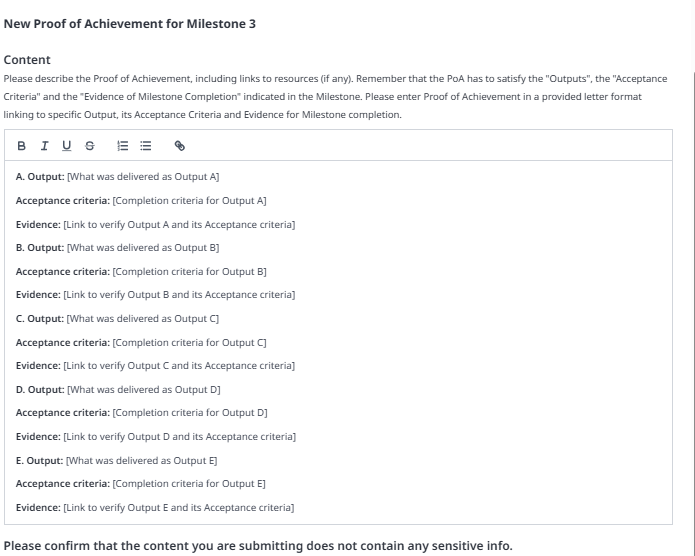
#### 5. Milestone and Proof of Achievement (PoA) Template
A standardized template has been introduced for both Milestone and Proof of Achievement (PoA) submission.
**Submission forms**
\
In the Milestone submission form, Funded Proposer (FP) should provide a list of outputs in ABC formats and list corresponding Acceptance criteria in A1, B1, C1 and evidence in A2. B2, C2 format.
PoA form is structured in the same way to easily track the progress.
This update ensures that all Funded Proposers submit milestones in a consistent, unified format, with PoA submissions directly linked to their corresponding milestone and allow Reviewers to easily perform reviews.\
\
**Milestone template**
**PoA template**
#### 6. Milestone module: Title, Pagination & Dates and times
**Milestone Title Limitation**
\
Milestone titles now have a maximum length of 80 characters. This encourages Funded Proposers to create concise, clear, and topic-specific titles for each milestone
**Pagination in URLs**
\
Pagination for lists, such as projects or users, is now reflected in the Milestone Module URL. As a result, when users navigate back or refresh the page, they remain on the same page rather than being redirected to the first page.
**UTC Timestamps**
\
Dates and times displayed in the Milestone Module now include the UTC time zone. This ensures clarity and consistency across regions, making it easier to track deadlines and review activities.
#### 7. Milestone Reviewer: Archive Review
The Admin Team can now archive reviews submitted by Milestone Reviewers that are assessed as low quality. When a review is archived, it will be moved to the archived section along with the reason for that. It will be publicly visible to ensure transparency. Reviewers whose review was archived, will be required to resubmit their review for the project.
#### 8. Placeholder for Milestones in Project Dashboard
The Project Dashboard now displays placeholders for all required milestones. This gives Funded Proposers and Milestone Reviewers immediate visibility into the total number of milestones that must be submitted during the onboarding period.
This enhancement increases transparency and ensures that milestone expectations are clearly understood from the outset.
### Milestone Reviewers: Updates
#### 1. Mantaining Reviewer Independence
To ensure independent and unbiased reviews, feedback from Reviewers assigned to the same project will remain hidden from one another until all reviews are completed.
Once a Reviewer submits their review, a notification will appear for the Proposer and other assigned Reviewer(s) indicating that a review has been submitted, without showing its content.
This feature helps maintain objectivity by preventing one Reviewer’s feedback from influencing another’s.
**Loom video** - [here](https://drive.google.com/file/d/1dg5eYup0kBKBTGxA-xrZGWQecQ6jdCGv/view)
#### 2. Review Form update
The Milestone and Proof of Achievement (PoA) review forms now include two mandatory checkboxes: **Approved** and **Not Approved**.\
Reviewers must select one of these options and provide written rationale in every review.
* **If Approved**
* For Milestone: explain how each part of the milestone fits within the project.
* For PoA: explain how the submitted evidence demonstrates that deliverables have been achieved
* **If Not Approved**
* Identify gaps, missing deliverables, or reasons why the milestone/PoA does not meet expectations.
**Milestone review template**
**PoA review template**
#### 3. Unified Formatting Capabilities
The Milestone and Proof of Achievement (PoA) review forms now use a unified formatting standard.
This ensures all reviews are presented in a consistent and professional structure, improving readability and delivering a more cohesive user experience across the platform.
#### 4. Tracking Changes in Resubmissions
Reviewers can now easily track updates in Milestone and Proof of Achievement (PoA) resubmissions. By clicking the **“View changes”** button, Reviewers can see a clear comparison highlighting exactly what has been modified since the previous submission.
This improvement enhances review efficiency and ensures greater transparency throughout the resubmission process.
**Loom video** - [here](https://drive.google.com/file/d/17u1ep_TJLtAIbKhQqaJbHuLqoy2g39pD/view)
#### 5. Timeline for Milestone Reviewers
Reviewers can now easily see when each milestone was submitted by a Funded Proposer and how long it has been awaiting review. If a milestone is reassigned, the waiting time for the newly assigned Reviewer is recalculated from the reassignment date.
This helps Reviewers manage their workload more efficiently by prioritizing milestones that have been waiting the longest.
The list is visible in To-do list/updates tab.
### Changes for Funded Proposers
#### 1. Confirmation of Addressed Reviewer Feedback
When re-submitting a Milestone or Proof of Achievement (PoA), Funded Proposers must now tick a confirmation checkbox to acknowledge that they have addressed the Reviewer’s feedback. This acknowledgment is required before the resubmission can be completed.\
\
Once the Proposer presses the Resubmit Milestone/Proof of Achievement button, a notification confirms that the acknowledgment has been recorded.
This update ensures all resubmissions explicitly consider Reviewer feedback, enhancing transparency and accountability throughout the review process.
**Milestone resubmission confirmation**
**Proof of Achievement resubmission confirmation**
#### 2. Proof of Achievement (PoA) Submission Checklist
A new checklist has been added to the Proof of Achievement (PoA) submission form for Funded Proposers.
A new checklist has been added to the Proof of Achievement (PoA) submission form for Funded Proposers. Before submitting milestone evidence, Proposers must complete the checklist, marking each requirement as addressed.
This feature guides Proposers through all milestone criteria, ensuring nothing is missed and enabling confident, complete submissions.
---
# Agent Instructions
This documentation is published with GitBook. GitBook is the documentation platform designed so that both humans and AI agents can read, navigate, and reason over technical content effectively. Learn more at gitbook.com.
## Querying This Documentation
If you need additional information that is not directly available in this page, you can query the documentation by asking a question.
Perform an HTTP GET request on the following URL with the `ask` and `goal` query parameters:
```
GET https://docs.projectcatalyst.io/catalyst-tools/milestone-module/latest-changes-in-the-milestone-module.md?ask=&goal=
```
`ask` is the immediate question: it should be specific, self-contained, and written in natural language.
`goal` is what the user is ultimately trying to achieve, the reason they need the answer. Sharing it helps GitBook give you a better, more relevant answer. A goal is most helpful when it describes the outcome the user wants rather than restating the question. For example, with `ask=how do I create an API token`, a goal like `automate deployments from our CI pipeline` lets GitBook tailor the answer to that use case.
The response will contain a direct answer to the question and relevant excerpts and sources from the documentation.
Use this mechanism when the answer is not explicitly present in the current page, you need clarification or additional context, or you want to retrieve related documentation sections.